Logs export
The ArconQ logs component supports exporting logs in two formats:
JSON Lines (
.jsonlextension)- Purpose: Ideal for developers and further data processing.
- Usage: Each log entry is a separate JSON object, making it easy to parse and manipulate programmatically.
- Data: All data fields are exported.
CSV (
.csvextension)- Purpose: Suitable for human readability and visualization.
- Usage: Can be opened and visualized in various programs, such as Microsoft Excel, providing a tabular view of the log data.
- Data: Only a few of the most important columns are exported.
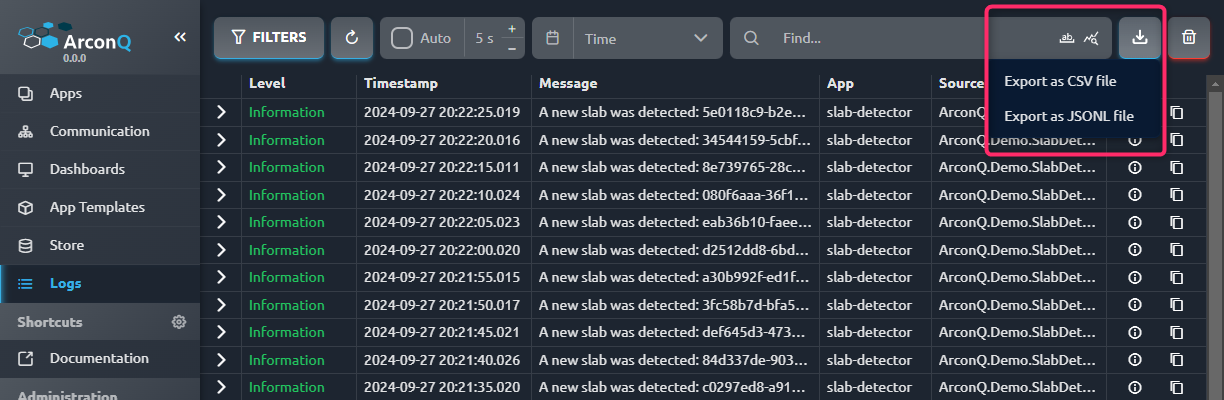
Filtering
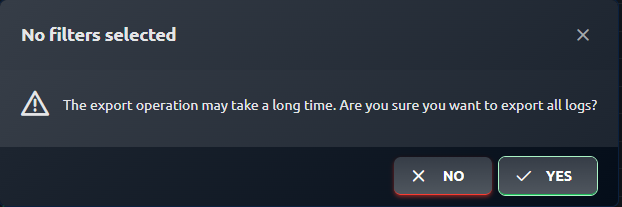
The filters you currently have applied will be used in the export file, meaning the data you see is what will be exported. If no filters are applied, a confirmation dialog will appear to ensure you're aware that creating the export file might take some time.
Example export files
CSV
File contents:
Timestamp,Level,Message,ApplicationName,WorkspaceName,IsInfrastructure,TraceId,SpanId,SourceContext,ExceptionStackTrace,ExceptionMessage
09/27/2024 18:57:20,Information,A new slab was detected: 71cc2e6f-5d13-4253-8038-25d2ca5a96bd - Stainless steel - Grain size: 26.464095296479694,slab-detector,Steel factory,False,500e07f2b2e9263e58d669e2806c00f8,4403a2ee0516bc74,ArconQ.Demo.SlabDetector.Server.Services.SlabDetectionService,,
09/27/2024 18:57:15,Information,A new slab was detected: 652f1f2b-53ae-470d-b098-95d52812a7c1 - Carbon Steel - Grain size: 50.266247830518964,slab-detector,Steel factory,False,593d5c14258188e22c3b0a814f686fc8,fba5aa1c8e0b8e9a,ArconQ.Demo.SlabDetector.Server.Services.SlabDetectionService,,
Example preview:

JSON lines
{"Id":null,"@timestamp":"2024-09-27T18:57:20.0151516+00:00","Timestamp":"2024-09-27T18:57:20.0151516+00:00","Level":"Information","Fields":{"SourceContext":"ArconQ.Demo.SlabDetector.Server.Services.SlabDetectionService","ActionId":"1ae6ba49-8c94-4dff-b452-9ad38390ad43","ActionName":"PCT.AppProxy.Controllers.LoggingController.LogMessageAsync (PCT.AppProxy)","RequestId":"0HN6V4F0TRCRP:000000D8","RequestPath":"/api/v1.1/logging/:log","ConnectionId":"0HN6V4F0TRCRP","WorkspaceName":"Steel factory","ApplicationName":"slab-detector","SpanId":"4403a2ee0516bc74","TraceId":"500e07f2b2e9263e58d669e2806c00f8","ParentId":"00-500e07f2b2e9263e58d669e2806c00f8-2d06c59342172768-00","IsInfrastructure":false},"Message":"A new slab was detected: 71cc2e6f-5d13-4253-8038-25d2ca5a96bd - Stainless steel - Grain size: 26.464095296479694"}
{"Id":null,"@timestamp":"2024-09-27T18:57:15.0078789+00:00","Timestamp":"2024-09-27T18:57:15.0078789+00:00","Level":"Information","Fields":{"SourceContext":"ArconQ.Demo.SlabDetector.Server.Services.SlabDetectionService","ActionId":"1ae6ba49-8c94-4dff-b452-9ad38390ad43","ActionName":"PCT.AppProxy.Controllers.LoggingController.LogMessageAsync (PCT.AppProxy)","RequestId":"0HN6V4F0TRCRP:000000D7","RequestPath":"/api/v1.1/logging/:log","ConnectionId":"0HN6V4F0TRCRP","WorkspaceName":"Steel factory","ApplicationName":"slab-detector","SpanId":"fba5aa1c8e0b8e9a","TraceId":"593d5c14258188e22c3b0a814f686fc8","ParentId":"00-593d5c14258188e22c3b0a814f686fc8-834690ef42576675-00","IsInfrastructure":false},"Message":"A new slab was detected: 652f1f2b-53ae-470d-b098-95d52812a7c1 - Carbon Steel - Grain size: 50.266247830518964"}