Authorization
Authorization with built-in Web console
The ArconQ Authorization feature allows customers logged in Web console to utilize existing Access Tokens obtained from ArconQ's identity provider (Keycloak) for request authorization within their client applications. By integrating this feature, you can ensure secure and authenticated access to your application endpoints.
In order to add ArconQ Authorization it's necessary to add the following code to your application
builder.Services.AddArconQAuthorization(builder.Configuration);
app.UseAuthentication();
app.UseAuthorization();
Below you can find full example code with ArconQ Authorization added.
var builder = WebApplication.CreateBuilder(args);
builder.WebHost.ConfigureArconQ(builder.Configuration);
builder.Services.AddArconQ(builder.Configuration);

builder.Services.AddArconQAuthorization(builder.Configuration);
builder.Services.AddControllers();

var app = builder.Build();
app.UsePublicApp(builder.Configuration).AddCustomUserInterface("swagger", "/swagger");
app.UseArconQ();
app.MapArconQ();

app.UseAuthentication();
app.UseAuthorization();
app.MapControllers();

await app.RunAsync();
With ArconQ Authorization configured you can simply use [Authorize] attribute on your endpoints to secure them
[Authorize]
[HttpPost]
public void Post(string value)
{
    Console.WriteLine($"post {value}");
}
Furthermore it's possible to use ArconQ Roles by adding it to Authorize attribute. This way only users with the specific role will have access to the endpoint
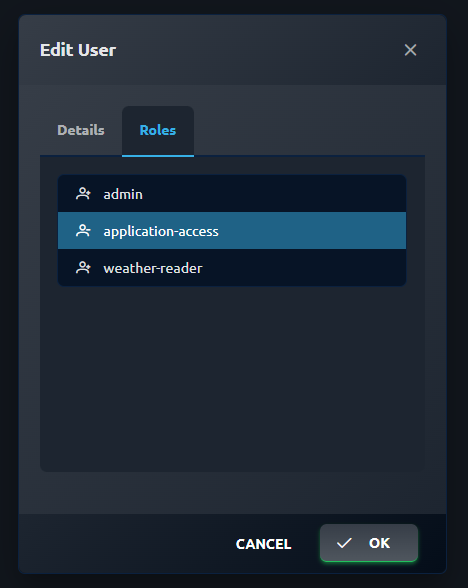
[Authorize(Roles = "application-access")]
[HttpGet("{id}")]
public string Get(int id)
{
    return $"value {id}";
}
Authorization with External Clients (out of Web console)
External Clients allow access to authorized endpoints without logging into the Web console. This section provides guidance on obtaining and using a JWT token for authorization. The management of External Clients, including creation, editing, obtaining secrets, and assigning roles, can be done in the 'External Clients' menu.
Authorization can be applied using both the [Authorize] attribute and the [Authorize(Roles="sample-role")] attribute.
Obtaining a JWT Token
To acquire a JWT token, send a POST request to the token issuer with your client credentials. The issuer will authenticate the request and return a JWT token. The following code snippet demonstrates this process in C#:
var httpClient = new HttpClient();

// Fetch OpenID configuration from the ArconQ realm's discovery endpoint
using var response = await httpClient.GetAsync("https://arconq.prod/identity-provider/realms/arconq/.well-known/openid-configuration");
var openIdConfigResponse = JsonSerializer.Deserialize<OpenIdConfigResponse>(await response.Content.ReadAsStringAsync(), new JsonSerializerOptions
{
    PropertyNamingPolicy = JsonNamingPolicy.CamelCase,
    DictionaryKeyPolicy = JsonNamingPolicy.CamelCase
});

var tokenEndpoint = openIdConfigResponse.TokenEndpoint;

// Prepare token request
var tokenRequest = new HttpRequestMessage();
tokenRequest.RequestUri = new Uri(tokenEndpoint);
tokenRequest.Method = HttpMethod.Post;

var formData = new List<KeyValuePair<string, string>>
{
    new KeyValuePair<string, string>("client_id", "CLIENT_ID_PLACEHOLDER"),
    new KeyValuePair<string, string>("client_secret", "CLIENT_SECRET_PLACEHOLDER"),
    new KeyValuePair<string, string>("grant_type", "client_credentials")
};
tokenRequest.Content = new FormUrlEncodedContent(formData);

// Send token request
var tokenResponse = await httpClient.SendAsync(tokenRequest);
var tokenResult = await tokenResponse.Content.ReadAsStringAsync();
Console.WriteLine(tokenResult);

class OpenIdConfigResponse
{
    [JsonPropertyName("token_endpoint")]
    public string TokenEndpoint { get; set; }
}
Replace "CLIENT_ID_PLACEHOLDER" with your External ClientId and "CLIENT_SECRET_PLACEHOLDER" with your External Client secret.
Using a JWT Token
Once you have obtained the JWT token, you can use it for further authorization or parse it to examine its claims. The following code demonstrates how to parse a JWT token using the System.IdentityModel.Tokens.Jwt package in .NET:
using System.IdentityModel.Tokens.Jwt;

var jwtHandler = new JwtSecurityTokenHandler();
var token = jwtHandler.ReadJwtToken(jwtAsString);

var expiration = token.ValidTo;
To check a specific claim, you can use the Claims property of the JwtSecurityToken object:
var isInRole = token.Claims.Any(c => c.Type == "role" && c.Value == "admin");
Using the JWT Token for Authorization
To authenticate subsequent HTTP requests using the JWT token, include it in the Authorization header as a Bearer token. The server will use the JWT token to identify the user or application. Here's an example of making a GET request with a Bearer token using HttpClient in C#:
...
using var requestMessage = new HttpRequestMessage(HttpMethod.Get, uriString);
requestMessage.Headers.Authorization = new AuthenticationHeaderValue("Bearer", jwtToken);

if (payload != null)
{
    requestMessage.Content = SetHttpContent(payload);
}

var response = await httpClient.SendAsync(requestMessage);
...
Make sure to replace jwtToken with your actual JWT token and uriString with the URI of the resource you are requesting. If there is any payload (data) to be sent with the request, it can be added using the SetHttpContent method according to your application's needs.