Preparing App Template
Example content of a packed app.
C:.
│   main.py
│   requirements.txt
│
├───containers
│       container.py
│
├───contracts
│       example_message.py
│
├───message_handlers
│       example_message_handler.py
│
├───routers
│       examples_router.py
│
├───scheduled_job
│       example_scheduled_job.py
│
├───background_job
│       example_background_job.py
│
└───services
        hello_world_service.py
        messaging_service.py
        random_int_service.py
Requirements file
The package with app files must contain a requirements.txt file containing all the python dependencies needed to run the app. This file is read during the app startup in ArconQ where all the dependencies are installed.
You can generate it for example using pip inside your venv or poetry:
venv
.\venv\Scripts\activate
pip freeze > requirements.txt
Poetry
poetry export -f requirements.txt --without-hashes > requirements.txt
Creating App Template
There are two ways to create an App Template in ArconQ: Creating it by hand using the UI and creating it automatically via the CLI.
Using ArconQ UI
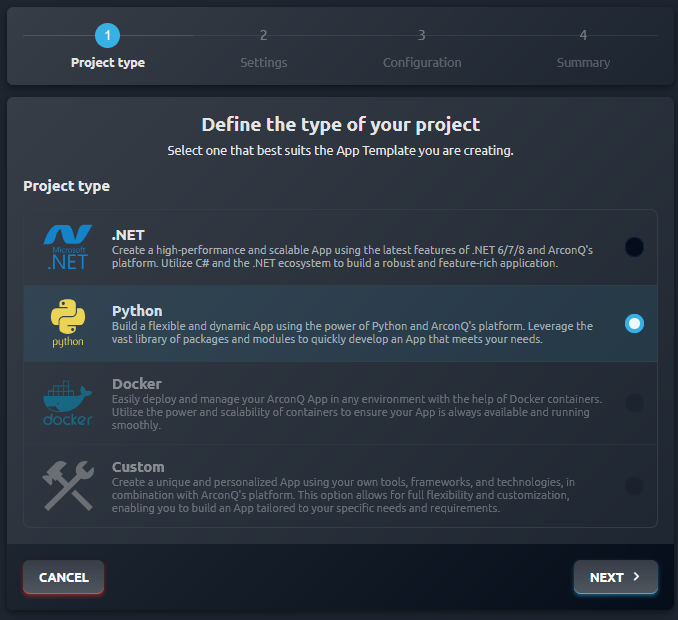
Step by step guide for a .NET app here. The flow for a Python app is mostly the same, you just need choose the Python project type:
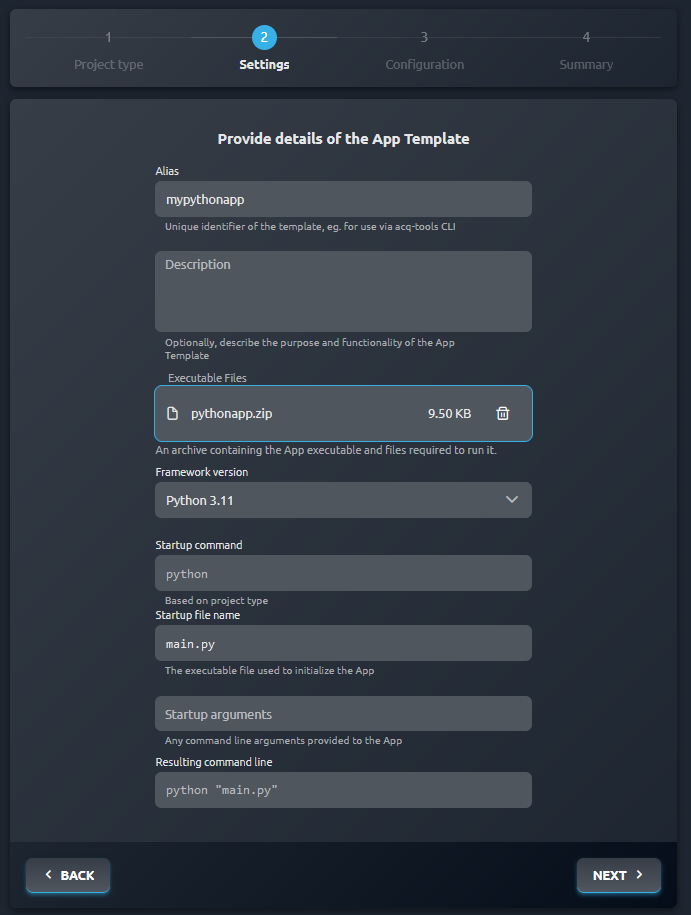
Example template data based on the app from example above:
Using ArconQ CLI
For more details about the CLI please refer to ArconQ CLI section.
example .arconq file
apps:
  pythonapp:
    description: It's a python app
    runtime: python311
    build:
      project: ./Python/example_app_source
      output: ./Python/example_app_build
      startupFile: ./Python/example_app_source/main.py
Please remember, that the requirements.txt file should be placed directly at the project path, and there shouldn't be any Python libraries files, e.g. venv directory. All the necessary dependencies will be downloaded during the app startup in ArconQ.